The Problem Steps Recorder (PSR) Alternative for Windows
StepSnap automatically documents your steps as a finished report — with screenshots, element names, and timestamps. Everything stays on your PC.
The familiar workflow of the Problem Steps Recorder (psr.exe) — brought up to date as a modern alternative.
No cloud, no account, no data transfer.
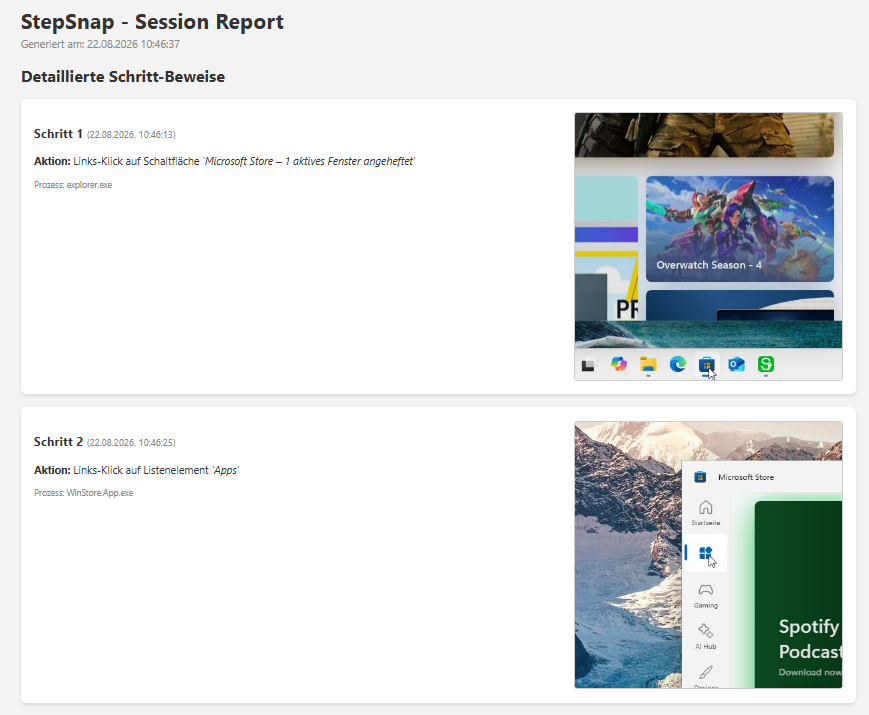
Built for IT support, QA testing, and environments with strict data-privacy requirements.
Microsoft removed the Problem Steps Recorder
For years, psr.exe was the tool that made support cases reproducible. In current Windows versions, it's gone.
What's left is manual work: take a screenshot, paste it, label it, repeat for the next step. For every single step.
StepSnap records in the background and generates the finished report at the click of a button.
How it works
Start recording
Via the app window or with Ctrl+Shift+R. StepSnap then runs quietly in the background.
Keep working as usual
Every click is captured with a screenshot, element name, and timestamp — without you doing anything.
Export the report
One click, and the finished report lands as an HTML file on your desktop.
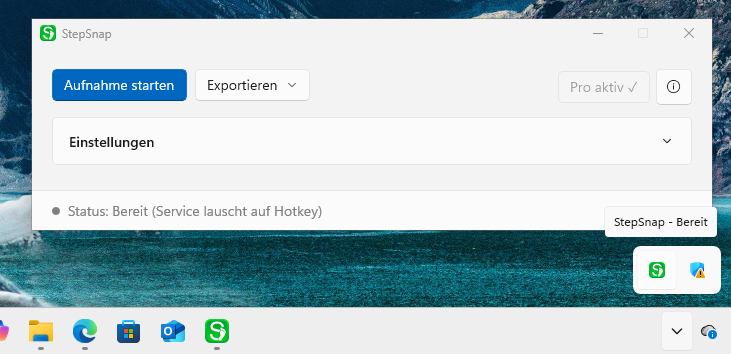
Runs quietly in the background
StepSnap sits in the taskbar's notification area. You only need the window to start and export.
What makes the report useful
Real element names
"Left-click on 'Save' button" instead of raw coordinates. StepSnap reads out Windows accessibility information.
Cropped, not full-screen
Every screenshot is cropped around the click. The reader immediately sees what it's about.
Optional local AI
If you have Ollama installed, StepSnap turns the raw data into a coherent set of instructions. Without Ollama, everything else works unchanged.
Nothing leaves your PC
StepSnap has no cloud connection, no user account, and no registration. There's no server anything could be sent to.
- Screenshots and recording data stay exclusively on your local machine.
- Detected password fields are masked. For apps that don't identify themselves as such, keyboard logging can be turned off entirely.
- The optional AI summary runs via an Ollama instance on your own machine — not with a provider.
- Recording only runs when you start it. The icon in the notification area always shows the current state.
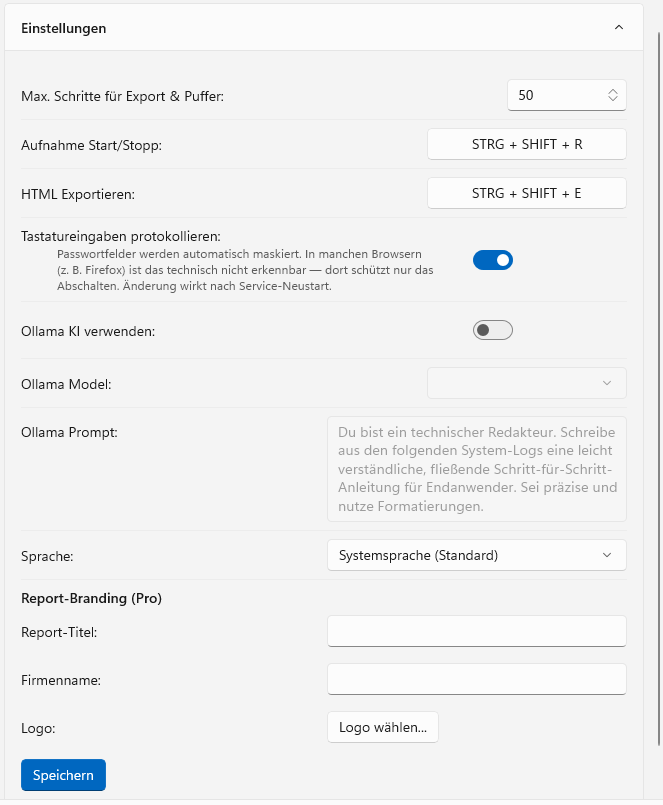
Actually switchable, not just promised
Keyboard logging can be fully disabled in settings. Then not a single keystroke is captured — regardless of which application is in the foreground.
Free to use, Pro as a one-time purchase
Free
- Background recording
- HTML report with screenshots
- Up to 50 steps per report
- Watermarked screenshots
- AI summary if Ollama is installed
Pro
- Screenshots without watermark
- Up to 10,000 steps per report
- Export as PDF
- Custom title, company name, and logo in the report
- Everything in Free
Paid plans of comparable tools run $14–35 per month (as of August 2026). StepSnap Pro costs a one-time €9.99, converted to your local currency in the Store — no recurring costs.
Frequently asked questions
Does StepSnap run on Windows 10?
Yes, from Windows 10 version 2004 onward. One limitation: the yellow capture border Windows draws around recorded areas can only be suppressed from Windows 11 onward. On Windows 10 it remains visible in screenshots.
Are my screenshots transmitted anywhere?
No. StepSnap has no cloud connection and no user account. Recordings and reports never leave your machine. Two connections can occur: the optional AI evaluation via an Ollama instance on the same device, and a license check with the Microsoft Store on export. Neither transmits any recording data.
Do I need Ollama?
No. Ollama is only used for the automatically written instructions. Recording, screenshots, element names, and the full report work without any additional software.
What does Pro cost, and is it a subscription?
Pro costs a one-time €9.99 (converted to your local currency), billed through the Microsoft Store. It is not a subscription — no renewal, no recurring costs.
Can I use StepSnap in a government agency or bank?
Nothing technical speaks against it: StepSnap works entirely locally, needs no account, and transmits no data. Whether it's permitted in your organization is a decision for your own IT security or data protection team — that review isn't something we can do for you.
Is StepSnap a good alternative to the Windows Problem Steps Recorder (PSR)?
Yes — StepSnap was built specifically to replace psr.exe after Microsoft removed it. It keeps the same familiar recording workflow, and adds cropped screenshots, real UI element names, and an optional AI-written summary, while staying fully local.
Try it yourself
The free version has no trial period and no account. Install, record, view the report.
Get it free from the Store